
Download Active ISO Burner – burn ISO, burn disc, ISO burner, burn CD, burn DVD, ISO recording, CD burning software, DVD burning software, disc burning tool, ISO image, disc recording software, Windows ISO burner, ISO file burner
Overview
Active ISO Burner es una utilidad especializada diseñada para usuarios que necesitan grabar archivos de imagen ISO en medios ópticos físicos como CD y DVD. La aplicación sirve como una herramienta fiable para copias de seguridad de datos, distribución de software y creación de medios, ofreciendo una solución simplificada para usuarios que requieren capacidades de grabación de discos consistentes y precisas. Su propósito principal es simplificar el proceso de convertir archivos ISO digitales en discos físicos, lo que la hace particularmente valiosa para profesionales, educadores y administradores de TI que gestionan frecuentemente instalaciones de software o proyectos de archivado.
Los usuarios objetivo incluyen individuos y organizaciones que dependen de medios ópticos para el despliegue de software, distribución multimedia o almacenamiento de datos a largo plazo. La aplicación aborda puntos de dolor comunes asociados con software de grabación complejo, como interfaces saturadas, resultados inconsistentes y soporte limitado de formatos. Al centrarse en la usabilidad y la compatibilidad, Active ISO Burner proporciona una alternativa fiable a herramientas más cargadas de funciones o desactualizadas.
Desarrollada por Active ISO Burner, la aplicación está diseñada para la plataforma Windows y está disponible desde 2019. Aunque los detalles específicos sobre el equipo de desarrollo no se divulgan públicamente, la funcionalidad constante de la aplicación y su conjunto de características claro sugieren un esfuerzo de desarrollo enfocado y dedicado. En el ecosistema de software más amplio, Active ISO Burner llena un nicho para herramientas ligeras y eficientes de grabación de discos, especialmente en entornos donde la automatización y el soporte multiformato son esenciales.
Key Features & Functionality
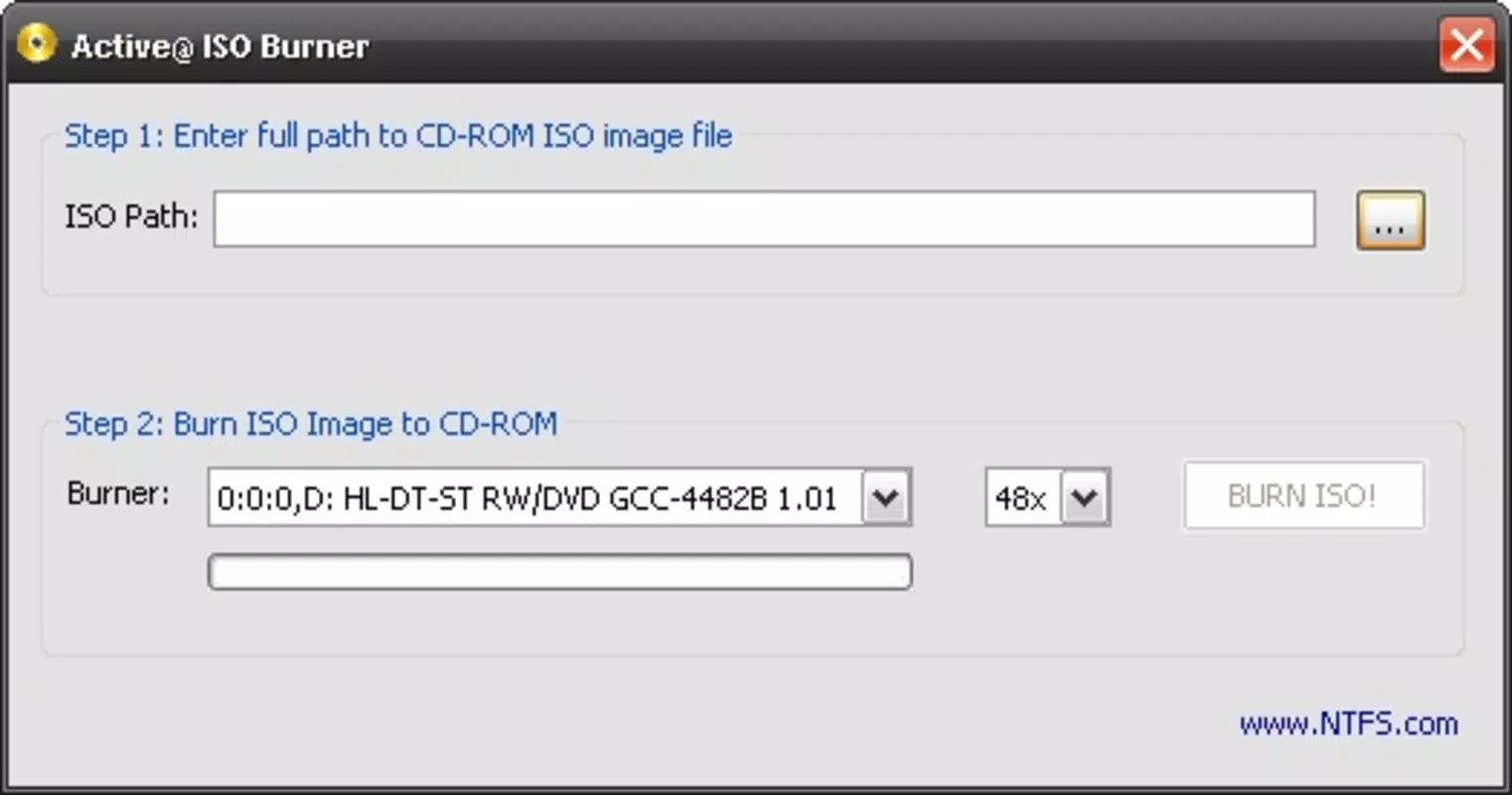
- Simple Interface: The application features a clean, intuitive layout that prioritizes accessibility. Essential functions like file loading, drive selection, and burn initiation are clearly labeled and logically arranged, reducing the learning curve for new users.
- Fast ISO Recording: With a streamlined workflow requiring only three to four clicks, users can initiate burns quickly. This efficiency minimizes setup time and enhances productivity, particularly when handling multiple ISO files.
- Multiple Disc Formats: Active ISO Burner supports a wide range of optical media, including CD-R, DVD-R, DVD+R, CD-RW, DVD-RW, and DVD+RW. This versatility ensures compatibility with various hardware and use cases, from basic data storage to software installation media.
- Command Line Functionality: Advanced users can leverage the command-line interface to automate burning tasks or integrate the tool into batch scripts and system workflows, enhancing its utility in enterprise and technical environments.
For example, a system administrator might use the command-line feature to script nightly backups of ISO images to DVDs, while a home user could quickly burn a bootable Windows installation disc with minimal effort. The combination of speed, simplicity, and technical depth makes Active ISO Burner a practical choice for both casual and professional users.
Real-World Use Cases
One common scenario involves educators preparing installation discs for computer labs. By using Active ISO Burner, they can efficiently burn ISO files of educational software or operating systems to multiple DVDs with consistent results. Similarly, IT professionals may use the tool to distribute software updates or create recovery media, ensuring that all systems can be restored quickly in case of failure.
Interface, UX & Performance
The user interface of Active ISO Burner is designed with clarity and functionality in mind. The layout emphasizes essential controls, minimizing visual clutter and ensuring that users can locate key functions without confusion. Navigation is straightforward, with a logical flow from file selection to burn execution, supporting a seamless user experience.
Although the developer did not list formal performance metrics, the application’s design suggests responsiveness across a range of Windows systems. The tool operates efficiently without excessive resource consumption, which is critical for users working on older or low-spec machines. Stability appears to be a priority, as the app maintains consistent behavior during repeated use, reducing the risk of failed burns or system errors.
Performance on different device categories is not formally documented, but the lightweight nature of the application (15.4 MB) indicates it is optimized for minimal impact on system performance. Users can expect smooth operation during file loading, drive detection, and burn execution, even on devices with limited processing power or memory.
Platform Compatibility & Technical Requirements
Active ISO Burner is designed exclusively for the Windows operating system. The current version is 2.0, and the application has a file size of 15.4 MB. This compact footprint ensures quick installation and minimal disk space usage.
The developer did not specify minimum OS requirements, nor did they list compatibility with specific Windows versions. However, given its release date of 2019 and the nature of the tool, it is likely compatible with Windows 7 and later versions. Users should ensure their system has a functional optical drive to utilize the full functionality of the application.
Pros and Cons
Pros
- Intuitive, user-friendly interface suitable for beginners and experts alike
- Fast and efficient burn process with minimal clicks
- Supports multiple disc formats for broad compatibility
- Command-line functionality for automation and advanced users
- Lightweight design with low system resource usage
Cons
- Not available for macOS or Linux platforms
- Price point of $29.95 may be high for casual users
- No cloud integration or remote burning capabilities
- Developer did not provide detailed system requirements
- Only supports Windows-based systems
FAQ
Is Active ISO Burner safe to download and install?
Yes, the application is designed to operate securely on Windows systems. It does not include malware or intrusive behavior, and its functionality is limited to disc burning operations.
Can I use Active ISO Burner on older versions of Windows?
While the developer did not specify minimum OS requirements, the app is likely compatible with Windows 7 and later versions, given its release date and technical design.
Does Active ISO Burner support burning ISO files to USB drives?
No, the application is designed specifically for optical disc burning and does not support USB flash drive creation from ISO files.
Is there a free version or trial available?
The app is sold as a paid tool at $29.95. No free version or trial was mentioned in the provided information.
How do I update Active ISO Burner?
Users should check the official developer website for updates. The application does not include an automatic update feature, so manual checks are required.
Final Thoughts
Active ISO Burner stands out as a focused, efficient solution for users who need to burn ISO files to CDs and DVDs. Its clean interface, fast performance, and support for multiple disc formats make it a reliable choice for both everyday users and technical professionals. While its price and platform exclusivity may limit its appeal to some, the tool delivers strong value for those who depend on consistent, high-quality disc recording.
For educators, IT administrators, and anyone managing software or data backups, Active ISO Burner offers a dependable workflow with minimal friction. The inclusion of command-line support adds depth for advanced users, making it more than just a basic burning tool.
Download Active ISO Burner now


